Triskell and SAP integration

Connect SAP financial data with Triskell’s portfolio governance capabilities to manage budgets, actuals, commitments, and forecasts from one reliable view. Keep project and portfolio decisions aligned with real financial information, without relying on manual spreadsheet updates or disconnected reporting.

What you can achieve when
SAP and Triskell work together

The Triskell–SAP integration closes the gap between financial execution and portfolio governance, giving PMO and Finance teams the visibility they need to make faster, better-informed decisions.

Keep financial data aligned across SAP and Triskell

Bring SAP actuals, budgets, available amounts, and assigned costs into Triskell so PMOs, Finance, and portfolio teams work with the same numbers. This reduces manual reconciliation and helps teams trust the financial data behind every project decision.

Detect budget deviations earlier

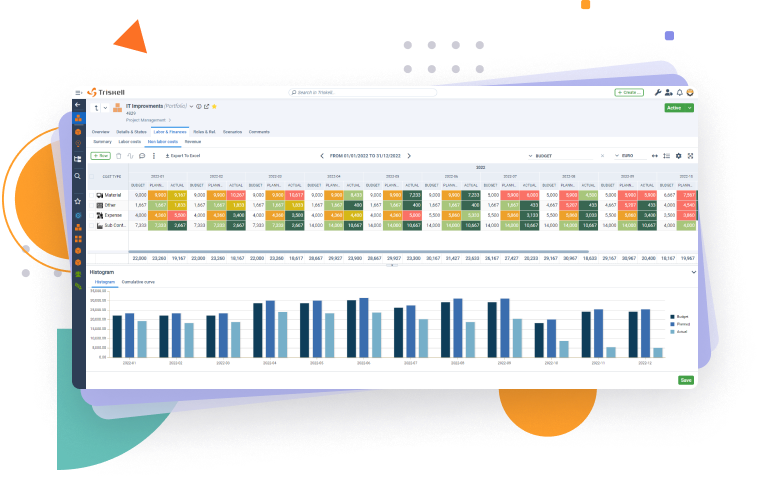
Compare planned, forecasted, and actual costs directly in Triskell using SAP financial data. Teams can identify overruns, underspend, and funding risks before they become end-of-quarter surprises.

Strengthen portfolio and funding governance

Connect SAP cost objects, such as WBS or project-related financial structures, with Triskell projects and initiatives. This creates a clearer link between approvals, funding decisions, project execution, and financial control.

Improve executive reporting

Combine delivery, portfolio, and financial information in Triskell to give leadership a clearer view of investment performance. Executives can understand not only what projects are moving forward, but also how they are performing against budget and expected value.

How to activate the Triskell + SAP integration

Start by defining which SAP financial data should be available in Triskell, such as budgets, actuals, available amounts, assigned costs, or commitments.

Use a shared identifier, such as a PEP/WBS element, to connect each SAP record with the right project or initiative in Triskell Platform.

Set up the agreed template or connection format so SAP data can be read correctly by Triskell. This can be done through structured files or through Triskell’s API.

Upload or send the SAP data to Triskell so the platform can process it and update the corresponding project financial fields.

Once activated, Triskell displays the latest SAP financial data at project, program, and portfolio level, helping teams make decisions with updated information.

Other applications Triskell can integrate with

Beyond SAP, Triskell integrates natively with the tools your organization already relies on.

Get started today

Request a demo of Triskell’s Enterprise PPM software and discover how it can suit the governance and management challenges of your organization.

FAQ Triskell and SAP integration

Triskell connects to SAP via its native API and file-based integration layer. SAP exports structured data (in Excel or TXT format aligned to predefined Triskell templates), which Triskell reads, maps to the corresponding projects and initiatives, and uses to update financial fields automatically. For organizations running S/4HANA or ECC, Triskell supports both scheduled automated syncs and on-demand data loads.

Triskell supports mapping to the most common SAP cost objects: WBS elements (Project Element Plan / PEP), internal orders, and cost centers. This covers the majority of SAP PS and FI/CO configurations and can be customized to match your organization’s specific chart of accounts and project structure.

No custom development is required. Triskell’s integration framework uses a guided configuration interface where business users or PMO administrators define the field mappings and data templates. IT involvement is typically limited to providing SAP credentials and approving network access — the configuration itself is handled within Triskell’s settings without writing code.

Yes. A single Triskell initiative or program can consolidate data from multiple SAP cost objects — such as several WBS elements across different business units or regions. Triskell rolls these up automatically, giving the PMO a unified cost view at project, program, and portfolio levels without any manual consolidation in spreadsheets.

By connecting SAP cost objects directly to Triskell initiatives, every financial transaction and budget change is traceable back to the originating SAP record. Triskell enforces approval workflows before any scope or budget change is reflected in SAP, ensuring that your CAPEX/OPEX classification remains consistent and auditable. 

No. The process starts by defining the SAP data to connect, mapping it to Triskell projects, setting up the data format, loading the information, and reviewing the updated financial views in Triskell. The goal is to make SAP financial data usable for portfolio decisions with minimal manual effort.