10 best Jira alternatives and competitors for medium and large companies in 2026

best alternatives and competitors to Jira

Jira alternatives are increasingly relevant for medium and large companies because Jira excels at Agile team execution, but falls short when you need portfolio-level visibility, hybrid governance, advanced resource management, and financial tracking without relying on a stack of plugins (or Jira Align). This guide compares 10 enterprise-ready options so you can choose a Jira replacement that scales with your complexity.

In this post, you will learn:

  • Why growing organizations look for alternatives to Jira (portfolio gaps, plugin dependency, limited customization, hybrid constraints, and cost at scale).
  • The key criteria to evaluate Jira competitors (PPM depth, scalability, flexibility, integrations, and cost-effectiveness).
  • The 10 best Jira alternatives in 2026: strengths, weaknesses, and ideal use cases for each.
TABLE OF CONTENTS

Why should medium and large companies look for alternatives to Jira?

Although Jira has been established for years as one of the best tools for Agile project management, it is not without its limitations. These problems are especially visible in companies that have a diverse portfolio of projects and products.

AGILE PORTFOLIO MANAGEMENT

Stop just managing projects, start delivering value

Explore Triskell Software’s Agile Portfolio Management solutions.

These are the main reasons why more and more companies are looking for alternatives to Jira to manage their project portfolios:

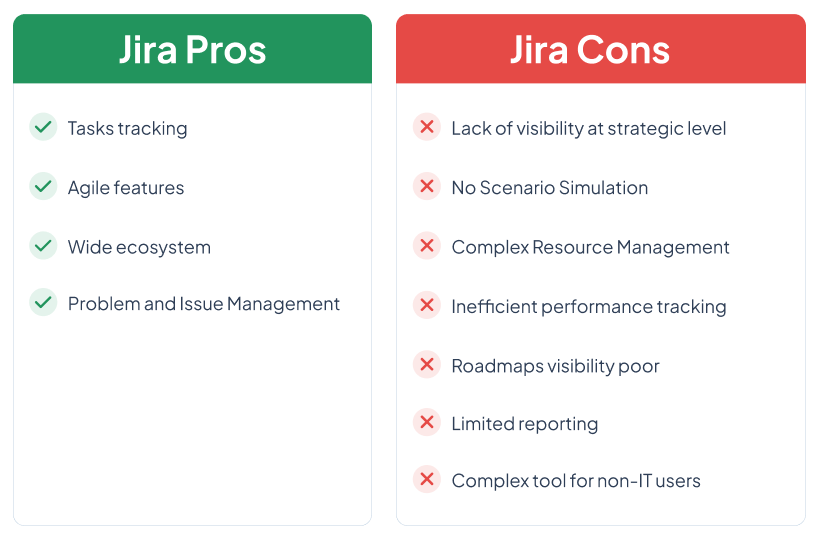
Lack of key functionalities for Portfolio Management

Jira works very well for tracking individual projects and for sprint planning. However, it lacks the capabilities needed to manage project portfolios in their entirety as a PPM software such as Triskell does.

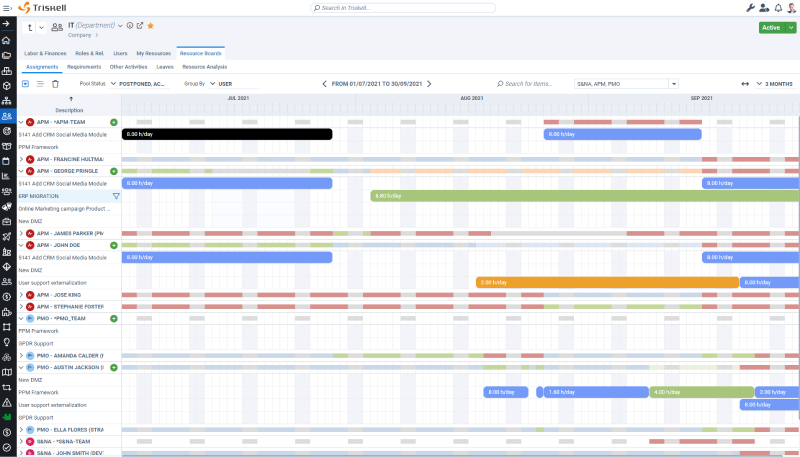
For example, Jira’s capabilities for Resource Management or financial tracking are very basic. Components that, for large companies that manage many projects and need visibility into resource allocation and project costs, are really critical.

Excessive dependency on plugins

The only solution Jira offers in this regard is to integrate the tool with Jira Align or other third-party applications, which means companies invest even more money in a solution that is not cheap per se.

And this is another of Jira’s issues: to get the most out of it, you must resort to plugins and also integrate it with third-party tools. And there are very basic project management functionalities, such as time tracking, Scenario Simulation or advanced reports, that require these plugins. Which not only means, in many cases, an additional cost, but can also mean configuration and compatibility problems in the tool itself.

Limited customization options

Although Jira offers customization options, these are not as advanced and flexible as today’s businesses need. Creating custom workflows or reports in Jira in many cases requires coding knowledge or a very complex configuration of the tool.

Today’s companies need solutions that adapt to their processes, not the other way around. Therefore, a structure as rigid as Jira’s, especially in aspects such as permissions, workflows and reports, can compromise the efficiency of both Agile and non-Agile teams.

Not compatible with hybrid management approaches

Jira works well when it comes to managing Agile projects. But it is not a tool designed for managing projects outside of Agile frameworks, let alone for Hybrid Project Management. Jira has plugins and options to solve this problem, but doing so can be cumbersome and time-consuming.

For medium to large companies where Agile and Waterfall projects coexist, there are other more flexible solutions that adapt to any management methodology without the need to spend a lot of time configuring the tool.

High cost for large teams

Price is another reason why companies look for possible alternatives to Jira. Although it has a free version, the cost skyrockets as users increase. Jira is a major expense for large companies, especially if it is used by several teams or departments.

Key aspects to consider when analyzing Jira competitors

If you are currently using Jira and you are determined to evaluate other alternatives, the first thing you should know is what to look for in each of the competitors. Especially if you want to implement this solution in a large organization.

These are the main aspects to take into account when analyzing possible alternatives to Jira:

  • Project portfolio management capabilities: with an all-in-one PPM solution you can not only manage and track your organization’s project portfolios, but also plan and execute strategy, as well as comprehensive resource and risk management at the portfolio level.
  • Hybrid project management approach: the solution you choose should offer flexibility to manage different types of projects. For example, it should include functionalities for Agile project management (e.g. Scrum and Kanban boards), as well as planning tools.
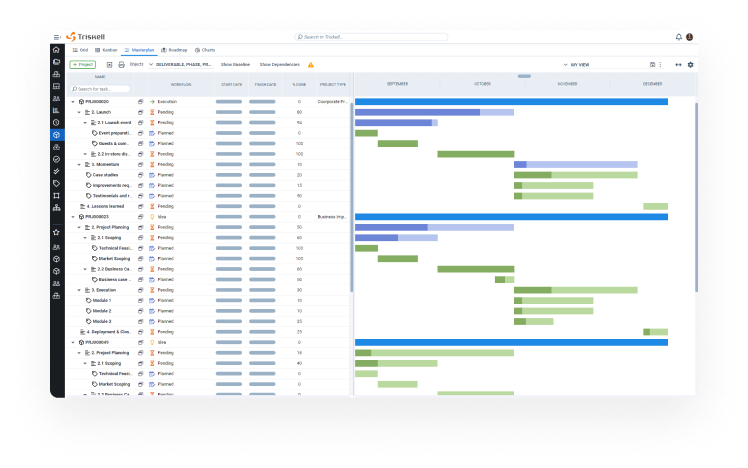
Triskell masterplan
  • Scalability and customization: the tool must evolve at the same pace as your organization does and be customized to meet the needs of your teams and departments. There is no point in looking for an alternative to Jira if you cannot change its configuration as the number of users or the complexity of projects increases.
  • Integrations: make sure the software integrates seamlessly with your organization’s application ecosystem. This includes CRM systems, ERP, business intelligence platforms and other project management tools.
  • Cost-effectiveness: when evaluating solution pricing, look not only at the initial price, but also at implementation and support costs, as well as the evolution of costs as the user base grows.

For more information on the more than 100 criteria to be taken into account when purchasing PPM software, we invite you to download the following checklist.

PPM SOFTWARE CHECKLIST

A Comprehensive buyer’s checklist for PPM Software

Use this quick checklist to compare potential modern PPM solutions in order to pick the best one for your organization.

10 best alternatives and competitors to Jira in 2026

Now that you know the reasons why medium and large companies should look for alternatives to Jira and the aspects you should take into account to choose the one that best suits the needs of your organization, let’s get to the heart of the matter.

Below, we show you the top 10 competitors and alternatives to Jira for 2026.

Alternative to Jira #1. Triskell Software

Triskell Software is an all-in-one PPM solution designed to help medium to large enterprises manage multiple project portfolios, align projects with business goals, and scale Agile practices across the organization.

As an alternative to Jira, it stands out above all for being one of the most advanced PPM solutions on the market, for supporting hybrid project management methodologies, in addition to its flexibility and scalability.

Hybrid approach to project portfolio management

Triskell’s PPM platform stands out for supporting any project management methodology. From a single interface you can manage different types of projects with both Agile and Waterfall methodologies, as well as other frameworks such as Phase-Gate, DevOps, SAFe, etc.

Unlike Jira, which is designed for Agile development teams, Triskell offers greater flexibility for organizations operating in hybrid environments. While Jira requires plugins or additional configuration to support non-Agile workflows, Triskell’s flexibility is included natively in the tool.

Enterprise Agile planning platform

Triskell is specially designed to work with frameworks like SAFe or Lean Portfolio Management. It includes functionalities such as Kanban and Scrum boards, and you can configure workflows dynamically at both project and portfolio level.

In contrast, Jira struggles to scale Agile to the enterprise level. To do so, you need to integrate other Atlassian’s own applications, such as Jira Align, plus other configurations in the tool itself.

Lean budgeting

Another of Triskell’s strengths over Jira is its Lean Budgeting capabilities, which include:

  • Aligning the budgets of each portfolio with Agile principles.
  • Planning cost allocation in short cycles.
  • Allocating and tracking costs based on the organization’s value streams.

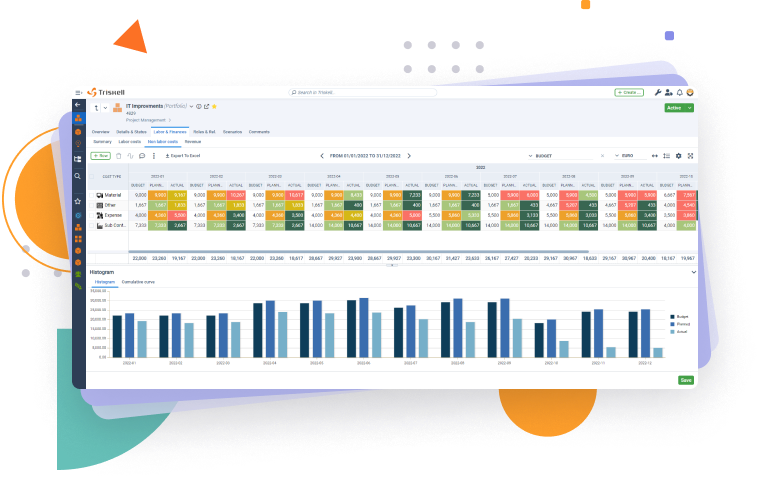
Jira, on the other hand, lacks financial management functionalities, and they are only available if you download applications or plugins from Atlassian’s marketplace. Something that does not happen in Triskell, since it integrates budget management directly into its strategic planning and project portfolio management processes.

Scalable and flexible

 In addition, Triskell stands out for its scalability and high configurability. It is a solution where you can easily set up your own workflows, views and data structures without coding.

Jira, on the other hand, requires advanced configuration to customize the tool on a large scale. And, as teams and project volumes grow, this additional configuration can become performance issues for the tool itself.

Other Triskell Software key features

  • Resource Management: it has advanced functionalities to allocate resources and plan capacity at enterprise level.
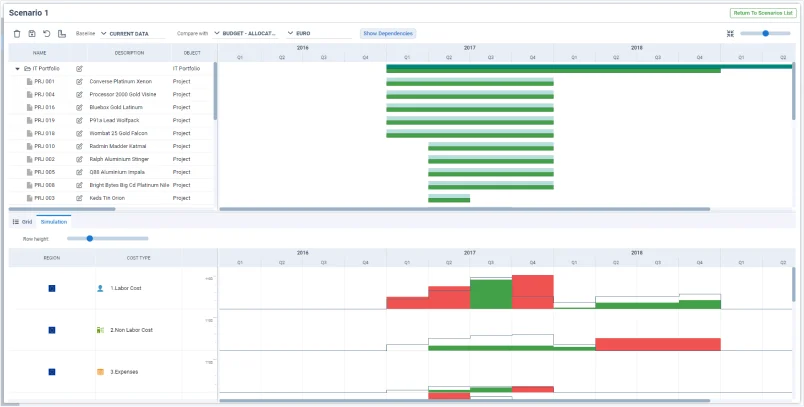
  • Scenario Simulation: you can plan and simulate what-if scenarios to make strategic decisions and improve the performance of your project portfolios.
  • Customized reports and dashboards: you can create reports and dashboards for each of the organization’s stakeholders.
  • Integrations: integrates with a wide variety of applications, from ERP or CRM systems, to Power BI, SAP, Teams or Microsoft Project.

Triskell Software cons and areas of improvement

  • Initial setup: For very large organizations, the initial implementation of the tool can take time, as it is necessary to configure the organization’s specific workflows and processes on the platform.
  • Learning curve: Due to its wide range of functionality, new users may find the platform somewhat overwhelming without adequate training.

Triskell software pricing

Customized pricing.

Triskell Software reviews

  • Capterra: 4.7/5
  • G2: 4.4/5

Frustrated with Jira limitations?

Request a demo of Triskell today and find out how it can help you streamline your project management and improve the productivity of your teams.

Alternative to Jira #2. Planview AgilePlace

Planview AgilePlace, formerly known as LeanKit, is a great alternative to Jira for large-scale Agile project management. It is especially designed for those organizations that want to adopt Lean or SAFe frameworks.

Key features of Planview AgilePlace

  • Kanban boards: their visual design makes them very intuitive for task management.
  • Customizable workflows: you can adapt the boards according to the specific needs of your organization.
  • Collaboration tools: its document sharing functionalities and real-time alerts and notifications facilitate teamwork.
  • Integrations: it integrates seamlessly with third-party applications, especially highlighting how well it integrates with ticketing tools.

Areas of improvement of Planview AgilePlace

  • User interface: Planview’s UI is not as intuitive when it comes to managing large projects or multiple cards simultaneously.
  • Stage Management: when compared to Jira, Stage Management in Planview has its limitations, especially for highly technical and Agile-oriented workflows.
  • Scope: For start-ups or smaller teams, Planview may not be the best choice because of all the enterprise-level functionality included in the tool.

Planview AgilePlace pricing

Customized pricing.

Planview AgilePlace reviews

  • Capterra: 4.5/5
  • G2: 4.1/5

SUBSCRIBE TO OUR NEWSLETTER

Get stories like this in your inbox

Alternative to Jira #3: Businessmap

Businessmap (formerly known as Kanbanize) is a Lean and Agile project portfolio management platform designed for medium and large enterprises. Built around Kanban principles, is particularly valuable for enterprises looking to scale Agile practices across the organization while maintaining control over strategy, resources, and performance metrics.

Key features of Businessmap

  • AI-powered productivity: built-in AI assistant that enhances productivity and the user experience.
  • Flexibility and customization: highly adaptable to both simple use cases and complex enterprise workflows.
  • Visual workflow management: intuitive, customizable workflows that fit different business scenarios.
  • Ongoing innovation: Continuous updates and improvements, ensuring the platform evolves with user needs.

Businessmap cons and areas of improvement

  • Reporting and initiative limits: Restrictions on the number of initiatives and limited reporting configurability can hinder advanced analysis.
  • High cost for small teams: Pricing may be expensive for smaller organizations, especially with data-heavy boards and automation.
  • User interface challenges: Excessive whitespace and unintuitive navigation (e.g., list views requiring extra steps).

Businessmap pricing

Annual plan: if you require 50 licenses, the cost is €8.00/ per user / month (total is €4800.00 / year).

Businessmap reviews

  • Capterra: 4.8/5
  • G2: 3.9/5

EBOOK

PPM Software Buyers’ Guide

What should you look for in a new PPM tool?

Alternative to Jira #4. Trello

Trello is a very intuitive and visual project management tool, ideal for small Agile teams. However, for larger organizations, it lacks some of the more advanced features that other alternatives to Jira, such as Triskell, offer.

Key features of Trello

  • Kanban-style boards: Trello’s Kanban-based board system is one of the simplest and most intuitive on the market.
  • Integrations: through its ‘Power-ups’ system. You can integrate Trello with other tools such as Slack, Google Drive and many others.
  • Automations: through the Butler tool, you can create rules to automate tasks.
  • Free version: its free plan is more than enough for many small Agile teams and even start-ups and SMEs.

Areas of improvement of Trello

  • Scalability: Trello is ideal for small teams and projects. But very limited for larger organizations or for complex projects.
  • Limited features: it does not have some functionalities that stand out in Jira, such as backlog management or sprint planning.
  • Dependency management: when it comes to Agile Project Management, dependency management is the big weakness of Trello.

Trello pricing

  • Free: $0 per user / month.
  • Standard: $5 per user / month.
  • Premium: $10 per user / month.
  • Enterprise: $13.13 per user / month (estimated price for 1,000 users).

Trello reviews

  • Capterra: 4.5/5
  • G2: 4.4/5

AGILE PORTFOLIO MANAGEMENT

Stop just managing projects, start delivering value

Explore Triskell Software’s Agile Portfolio Management solutions.

Alternative to Jira #5: Teamwork

Teamwork is a project management tool that can be a great alternative to Jira for teams that need time tracking and client management functionality to manage their projects.

Key features of Teamwork

  • Gantt charts: offers highly detailed and customizable Gantt charts.
  • Time tracking and invoicing: Teamwork is especially useful for companies in the service sector, since from the tool you can track time and manage project budgets.
  • Client management: it offers functionalities for invoicing, client registration, etc. Very useful if you work in an agency or consulting firm.
  • Task and subtask management: it breaks down in a very detailed way the tasks and the follow-up of these.

Areas of improvement of Teamwork

  • User interface: its interface is somewhat less intuitive when compared to other Jira competitors, such as Asana or Trello.
  • Learning curve: it offers so many functionalities that mastering all of them can seem overwhelming.
  • Mobile app: the experience with the mobile app when managing projects is not satisfactory.

Teamwork pricing

  • Deliver: €10.99 /user/month (minimum 3 users).
  • Growth: €19.99 /user/month (minimum 5 users).
  • Scale: €54.99 /user/month (minimum 5 users).
  • Enterprise: custom pricing.

Teamwork reviews

  • Capterra: 4.5/5
  • G2: 4.4/5

EBOOK

PPM Software Buyers’ Guide

What should you look for in a new PPM tool?

Alternative to Jira #6: Wrike

Wrike is a project management software that works in small, medium and large companies. It is a good alternative to Jira especially if your organization requires advanced task management and collaboration tools.

Key features of Wrike

  • Workflows: you can design and emulate your organization’s workflows in Wrike, whether for small or large-scale projects.
  • Reporting tools: allows you to create highly detailed reports and dashboards.
  • Dependency management: Wrike users appreciate its ability to manage dependencies between tasks.
  • Real-time collaboration: you can exchange files, open discussion forums, and set up real-time alerts and notifications.

Areas of improvement of Wrike

  • Price: it is one of the most expensive Jira competitors, especially for small businesses.
  • Cluttered interface: it includes so many functionalities that it makes its interface not seem to have a clear pattern.
  • Complexity: compared to other Jira alternatives such as Triskell or Trello, Wrike is a rather complicated software to master.

Wrike pricing

  • Free: $0 user/month.
  • Team: $9.80 user/month.
  • Business: $24.80 user/month.
  • Enterprise: custom pricing.
  • Pinnacle: custom pricing.

Wrike reviews

  • Capterra: 4.3/5
  • G2: 4.2/5

Frustrated with Jira limitations?

Request a demo of Triskell today and find out how it can help you streamline your project management and improve the productivity of your teams.

Alternative to Jira #7: AzureDevOps

Azure DevOps is a comprehensive development and project management solution from Microsoft. It is especially useful for teams working in a DevOps environment. And it’s precisely the fact that it’s so technical that can make this alternative to Jira ill-advised if you’re looking for a simpler, more intuitive platform.

Key features of AzureDevOps

  • Version control: developers will appreciate the capabilities of Azure DevOps to manage code through Git and TFVC (Team Foundation Version Control).
  • Backlog management: you can manage complex backlogs with ease, making it ideal for agile teams.
  • Integrations: it integrates seamlessly with Microsoft ecosystem applications, especially the Office package.

 Azure Dev Ops cons and areas of improvement

  • Complex for non-developers: it is a tool designed exclusively for development teams. If in your organization there are many projects that are managed with Waterfall, you can delete this competitor from the list.
  • Unintuitive interface: in line with the above, its interface is very technical, so the degree of adoption of the tool by non-technical users is not going to be favorable.
  • Implementation time: it is such a customizable tool that it can take time for teams to get the most out of it.

Azure DevOps pricing

  • Basic plan: first 5 users are free. After that, $6 per user/month.
  • Basic plan + Test: $52 per user/month.
  • Azure Pipelines: see the Microsoft Azure DevOps page for more information.
  • Azure DevOps Server: see the Microsoft Azure DevOps page for more information.

Azure DevOps reviews

  • Capterra: 4.3/5
  • G2: 4.3/5

SUBSCRIBE TO OUR NEWSLETTER

Get stories like this in your inbox

Alternative to Jira #8: Airtable

Airtable is a highly flexible project management tool with a spreadsheet-like interface. As an alternative to Jira, it’s particularly useful for teams managing data-driven projects.

Key features of Airtable

  • Automations: easily automate tasks to streamline workflows and reduce manual work.
  • Custom workflows: its spreadsheet-style interface offers endless possibilities for customizing the tool to your team’s specific needs.
  • Multiple views: switch between grid, Kanban, gallery, calendar, and more views to adapt to different work styles.
  • Integrations: it integrates with a wide range of popular tools like Slack, Google Drive, Salesforce, and Zendesk.

Airtable cons and areas of improvement

  • Lack of key features: it lacks some key features such as time tracking and resource allocation.
  • Limited scalability: not ideal for large teams or projects.
  • Cost: to access certain features, you need to opt for the “Business” plan, which can significantly increase the cost.

Airtable pricing

  • Free: it offers a basic free plan.
  • Team: $20/month per user.
  • Business: $45/month per user.
  • Enterprise Scale: Customized pricing for large enterprises.

Airtable reviews

  • Capterra: 4.7/5
  • G2: 4.6/5

EBOOK

PPM Software Buyers’ Guide

What should you look for in a new PPM tool?

Alternative to Jira #9. Smartsheet

Smartsheet is another alternative to Jira that, like Airtable, features a very similar interface to a spreadsheet but offers more advanced project management functionalities

Key features of Smartsheet

  • Spreadsheet-like interface: If your organization works with Excel, the transition to Smartsheet won’t be disruptive.
  • Project tracking and resource management: users highlight Smartsheet’s capabilities for tracking projects, budgets, and resource allocation.
  • Collaborative tools: it Includes features for sharing documents and adding comments.

Smartsheet cons and areas of improvement

  • Not suitable for Agile projects: unlike Jira, it lacks features such as sprint planning and backlog management.
  • Scalability: its spreadsheet-like design can make managing complex projects in Smartsheet as cumbersome as it is in Excel.

Smartsheet pricing

  • Pro: 17€ per user / month.
  • Business: €8 per user / month.
  • Enterprise: custom pricing.
  • Advanced Work Management: custom pricing.

Smartsheet reviews

  • Capterra: 4.5/5
  • G2: 4.4/5

Alternative to Jira #10. Notion

And the last Jira alternative we’re going to analyze is Notion, a very flexible all-in-one solution from which you can manage projects, take notes, and manage databases. All from a single platform.

Key features of Notion

  • Customizable workspaces: It has many templates to create a workspace adapted to your organization’s specific workflows.
  • Knowledge management: Notion offers various knowledge management tools such as Meeting Notes, Project Plans, presentations, etc.
  • User-friendly interface: Notion has a very intuitive and easy-to-use interface design.

Notion cons and areas of improvement

  • Limitations for complex projects: Notion does not have features such as Backlog Management or Sprint Planning.
  • Reporting: It is also not possible to generate reports with the tool, which can limit you if you work on data-driven projects.
  • Offline access: Problems accessing the tool and editing documents when there is no connection are quite frequent.

Notion pricing

  • Free.
  • Plus: €9.50 per user/month.
  • Business: €14 per user/month.
  • Enterprise: Custom pricing.

Notion reviews

  • Capterra: 4.7/5
  • G2: 4.7/5

Conclusion: which Jira alternative is right for your business?

While Jira remains a highly useful tool, its limitations in terms of scalability, customization, and project portfolio management make it advisable to look for other options.

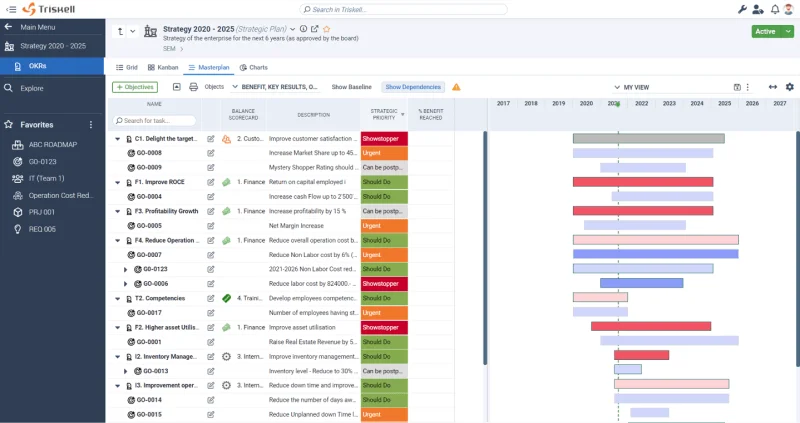
Strategic Dashboard in Triskell

For medium and large companies that manage multiple project portfolios, Triskell Software is the solution you are looking for. Its capabilities for hybrid project management, its scalability, and its features for Lean budgeting make it a top-tier option for companies seeking a comprehensive solution from which to plan and manage projects.

However, as you have read in this article, there are many options to choose from.

  • Trello or Asana may be an option if you only need a task management tool.
  • On the other hand, if you need a solution more focused on DevOps or Agile scaling frameworks, Azure DevOps and Planview are other options to consider.

Therefore, when choosing the best alternative to Jira, you must consider the specific needs, size, and long-term objectives of your organization. Only then can you choose the platform that will best maximize productivity and streamline project execution in your business.

Request a demo of Triskell Software

Triskell Software is the flexible solution you need to drive your organization’s portfolio management to excellence. Check it out for yourself by requesting a demo below.

Related Content

FAQ about competitors and alternatives to Jira

Medium and large companies look for alternatives to Jira when they need portfolio-level management and enterprise governance, and Jira becomes harder to scale due to plugin dependency, limited out-of-the-box PPM depth, constraints in hybrid environments, and higher costs as user counts grow.

Jira is strong for sprint planning and tracking individual Agile projects, but it lacks robust capabilities to manage entire portfolios, especially in resource management and financial tracking, which are critical at scale.

When comparing Jira competitors, prioritize:

  • PPM capabilities (portfolio visibility, governance, strategic alignment)
  • Hybrid delivery support (Agile + non-Agile in one system)
  • Scalability & customization (workflows, permissions, reporting)
  • Integrations (ERP/CRM/BI and your delivery stack)
  • Cost-effectiveness (licenses + add-ons + implementation/support)

In the article, Triskell Software and Planview AgilePlace are presented as top options for large enterprises due to scalability and enterprise-grade capabilities (PPM + Agile planning).

When comparing Jira competitors, prioritize:

  • PPM capabilities (portfolio visibility, governance, strategic alignment)
  • Hybrid delivery support (Agile + non-Agile in one system)
  • Scalability & customization (workflows, permissions, reporting)
  • Integrations (ERP/CRM/BI and your delivery stack)
  • Cost-effectiveness (licenses + add-ons + implementation/support)

If you are actively looking for an alternative to Jira for your organization, we are sure you will find these articles useful:

GARTNER® REPORT

3 PMO Best Practices to Support Multimethod Delivery

78% of PMO leaders reported operating in multimethodology delivery environments.

See the 3 best practices Gartner® recommends to align strategy, resources, and outcomes with confidence.